html+CSS3实现iOS7扁平化music图标
1、新建html文档。

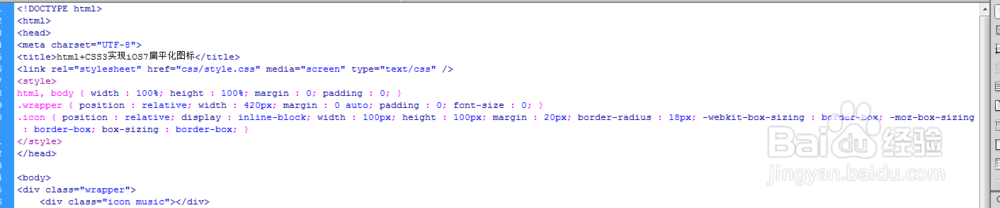
2、书写hmtl代码。
<div class="wrapper">
<div class="icon music">脾块驼</div>
</div>

3、初始化css代码爬忌。
<style>
html, body { width : 100%; height : 100%; margin : 0; padding : 0; }
.wrapper { position : relative; width : 420px; margin : 0 auto; padding : 0; font-size : 0; }
.icon { position : relative; display : inline-block; width : 100px; height : 100px; margin : 20px; border-radius : 18px; -webkit-box-sizing : border-box; -moz-box-sizing : border-box; box-sizing : border-box; }
</style>

4、书写陵宙css代码。
.music { overflow : hidden; box-shadow : 0 0 0 1px rgba(255, 76, 40, 0.5) inset; background : -webkit-linear-gradient(top, #ff2666 0%, #ff5b39 100%); background : -moz-linear-gradient(top, #ff2666 0%, #ff5b39 100%); background : -ms-linear-gradient(top, #ff2666 0%, #ff5b39 100%); background : -o-linear-gradient(top, #ff2666 0%, #ff5b39 100%); background : linear-gradient(top, #ff2666 0%, #ff5b39 100%); }
.music:before { position : absolute; content : '\266B'; width : 100%; height : 100px; font-family : "Helvetica Neue", Helvetica, Arial; font-size : 72px; font-weight : bold; text-align : center; line-height : 100px; text-align : center; text-shadow : 0 0 1px #fb2e22; color : #fff; -webkit-transform : scaleX(1.2); -moz-transform : scaleX(1.2); -ms-transform : scaleX(1.2); -o-transform : scaleX(1.2); transform : scaleX(1.2); }

5、代码整体结构
6、查看效果