如何修改Linux时区时间
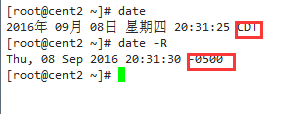
1、查看当前时间和时区。使用命令:
date
date -R
CST:中国标准时间(China Standard Time), UTC:协调世界时,又称世界标准时间,简称UTC,GMT:格林尼治标准时间(旧译格林威治平均时间或格林威治标准时间;英语:Greenwich Mean Time,GMT)是指位于英国伦敦郊区的皇家格林尼治天文台的标准时间,因为本初子午线被定义在通过那里的经线。CDT<美>中央时区,-0500表示西五区。我们国家,CST,东八区(+0800)
2、修改时区方法1。
使用命令:
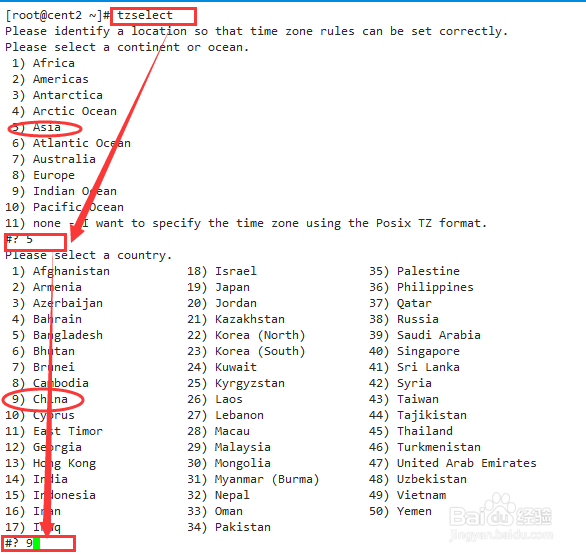
tzselect
tzselect命令只告诉你选择的时区的写法,并不会生效。所以现在它还不是东8区北京时间。你可以在.profile、.bash_profile或者/etc/profile中设置正确的TZ环境变量并导出。
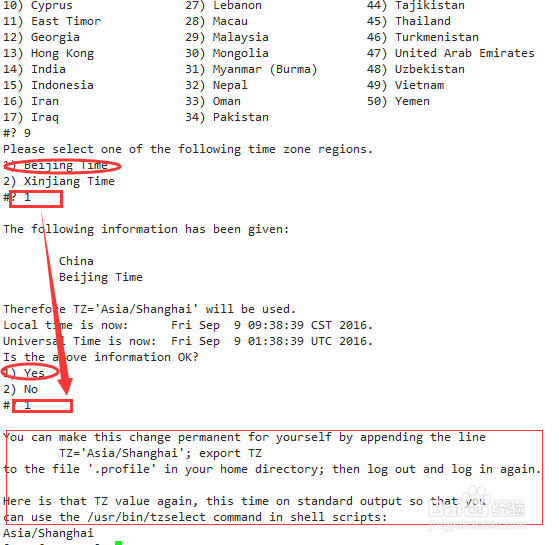
3、在/etc/profile里面设置 TZ='Asia/Shanghai'; export TZ并使其生效。修改时区成功,我们国家,CST,东八区(+0800)。
echo TZ='Asia/Shanghai'; export TZ >> /etc/profile
source /etc/profile
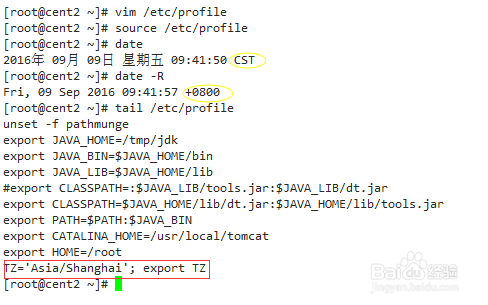
4、修改时区方法2。
复制相应的时区文件,替换系统时区文件;或者创建链接文件。时区文件在/usr/share/zoneinfo/,系统时区文件是/etc/localtime,使用命令:
cp /usr/share/zoneinfo/Asia/Shanghai /etc/localtime
或者
rm -f /etc/localtime
ln -sf /usr/share/zoneinfo/Asia/Shanghai /etc/localtime

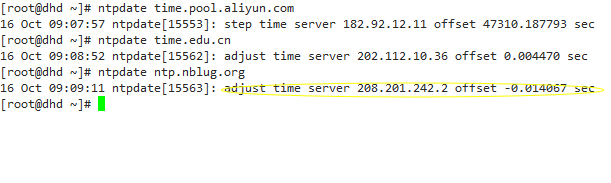
5、修改时间。使用命令:
ntpdate
ntpdate time.pool.aliyun.com
ntpdate ntp.nblug.org
6、将当前时间和日期写入BIOS,避免重启后失效。
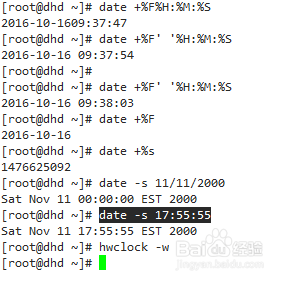
hwclock -w
再介绍一些date常用参数
date +%F' '%H:%M:%S
date +%F
date +%s
修改时间:月日小时分钟年
date 0102030405
date -s 月/日/年
date -s 11/11/2000
date -s 17:55:55