使用Visual Studio2010建立和使用dll文件 C++版
1、在新建项目中选择创建win32应用程序
2、在弹出的应用程序向导中做出如图选择:
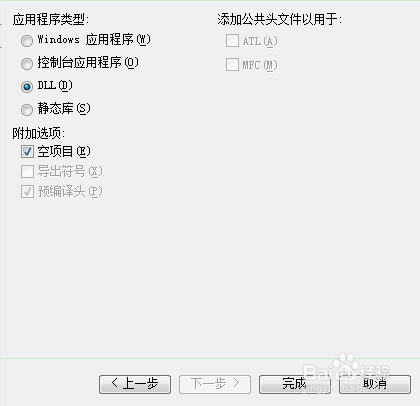
3、在头文件新建并添加Demoone.h
代码如下:
#ifndef _Demo_H_
#define _Demo_H_
#ifdef LIBDLL
#define LIBDLL extern "C" _declspec(dllimport)
#else
#define LIBDLL extern "C" _declspec(dllexport)
#endif
LIBDLL int Add(int plus1, int plus2);
#endif
4、在源文件下添加Demoone.cpp
代码如下:
#include "Demoone.h"
int Add ( int a , int b )
{
return ( a + b );
}
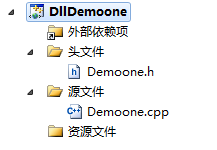
5、结构图如下:
6、点击生成解决方案即可

7、在项目目录下/debug/目录下存在DllDemoone.lib和DllDemoone.dll。
1、建立一个新的项目,将DLLDemoone.lib,DLLDemoone.dll以及Demoone.h复制到和项目代码相同的路径下。
2、在源代码中添加如下代码:
#include <iostream>
#include"Demoone.h"//方法a
using namespace std;
#pragma comment(lib, "DLLDemoone.lib")
//extern "C" _declspec(dllimport) int Add(int a, int b);//方法b
int main(int argc, char *argv[])
{
cout<<Add(2, 3)<<endl;
return 0;
}
3、运行结果为5