cadenceIC610安装错误总结(一)(图文教程)
1、当IC610安装成功后,也能够把软件打开,但就是在建立一个cell时,出现了下面的现象:
COPYRIGHT © 1992-2006 CADENCE DESIGN SYSTEMS INC. ALL RIGHTS RESERVED.
© 1992-2006 UNIX SYSTEMS Laboratories INC.,
Reproduced with permission.
This Cadence Design Systems program and online documentation are
proprietary/confidential information and may be disclosed/used only
as authorized in a license agreement controlling such use and disclosure.
RESTRICTED RIGHTS NOTICE (SHORT FORM)
Use/reproduction/disclosure is subject to restriction
set forth at FAR 1252.227-19 or its equivalent.
Program: @(#)$CDS: virtuoso.exe version 6.1.0 10/10/2006 14:09 (cds126047) $
Sub version: sub-version IC6.1.0.243 (32-bit addresses)
Loading geView.cxt
Loading LVS.cxt
Loading layerProc.cxt
Loading xlUI.cxt
Loading auCore.cxt
Loading schView.cxt
Loading selectSv.cxt
Loading vhdl.cxt
Loading seismic.cxt
Loading ams.cxt
ddCreateLib: Creating a new cds.lib file at '/home/redhat3/cds.lib'.
Created library "20150129" as "/home/redhat3/tmp/20150129"
*WARNING* (icLic-3) Could not get license Virtuoso_Schematic_Editor_L
(deLicense-5) Could not get the license for Schematics. Open aborted.
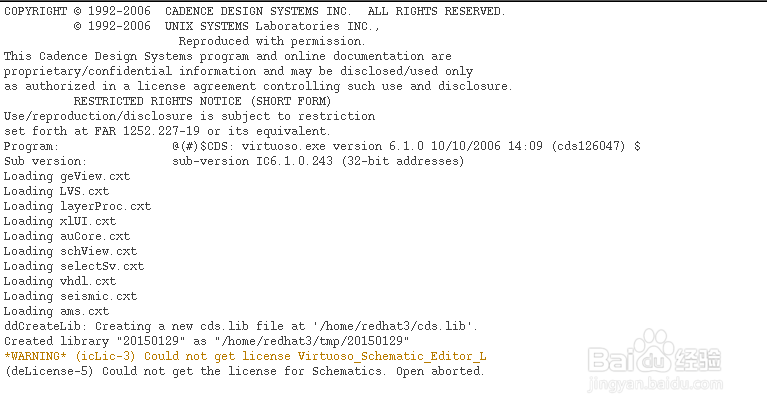
2、该提示说明不能得到license for Schematics,但是以前安装过,license明明是正确的,问题会出在哪里呢?重启后,出现了下面的提示:
license manager: can't initialize: Cannot find license file.
The license files (or license server system network addresses) attempted are
listed below. Use LM_LICENSE_FILE to use a different license file,
or contact your software provider for a license file.
Filename: /usr/local/flexlm/licenses/license.dat
License path: /usr/local/flexlm/licenses/license.dat
FLEXnet Licensing error:-1,359. System Error: 2 "No such file or directory"
For further information, refer to the FLEXnet Licensing End User Guide,
available at "www.macrovision.com".
17:40:43 (lmgrd) -----------------------------------------------
17:40:43 (lmgrd) Please Note:
17:40:43 (lmgrd)
17:40:43 (lmgrd) This log is intended for debug purposes only.
17:40:43 (lmgrd) In order to capture accurate license
17:40:43 (lmgrd) usage data into an organized repository,
17:40:43 (lmgrd) please enable report logging. Use Macrovision's
17:40:43 (lmgrd) software license administration solution,
17:40:43 (lmgrd) FLEXnet Manager, to readily gain visibility
17:40:43 (lmgrd) into license usage data and to create
17:40:43 (lmgrd) insightful reports on critical information like
17:40:43 (lmgrd) license availability and usage. FLEXnet Manager
17:40:43 (lmgrd) can be fully automated to run these reports on
17:40:43 (lmgrd) schedule and can be used to track license
17:40:43 (lmgrd) servers and usage across a heterogeneous
17:40:43 (lmgrd) network of servers including Windows NT, Linux
17:40:43 (lmgrd) and UNIX. Contact Macrovision at
17:40:43 (lmgrd) www.macrovision.com for more details on how to
17:40:43 (lmgrd) obtain an evaluation copy of FLEXnet Manager
17:40:43 (lmgrd) for your enterprise.
17:40:43 (lmgrd)
17:40:43 (lmgrd) -----------------------------------------------
17:40:43 (lmgrd)
17:40:43 (lmgrd)
17:40:43 (lmgrd) Using license file "/usr/local/flexlm/licenses/license.dat"
bash: ense.dat: command not found
[redhat3@localhost redhat3]$ source .bashrc
[redhat3@localhost redhat3]$ lmli
license manager: can't initialize: Cannot find license file.
The license files (or license server system network addresses) attempted are
listed below. Use LM_LICENSE_FILE to use a different license file,
or contact your software provider for a license file.
Filename: /usr/local/flexlm/licenses/license.dat
License path: /usr/local/flexlm/licenses/license.dat
FLEXnet Licensing error:-1,359. System Error: 2 "No such file or directory"
For further information, refer to the FLEXnet Licensing End User Guide,
available at "www.macrovision.com".
17:41:46 (lmgrd) -----------------------------------------------
17:41:46 (lmgrd) Please Note:
17:41:46 (lmgrd)
17:41:46 (lmgrd) This log is intended for debug purposes only.
17:41:46 (lmgrd) In order to capture accurate license
17:41:46 (lmgrd) usage data into an organized repository,
17:41:46 (lmgrd) please enable report logging. Use Macrovision's
17:41:46 (lmgrd) software license administration solution,
17:41:46 (lmgrd) FLEXnet Manager, to readily gain visibility
17:41:46 (lmgrd) into license usage data and to create
17:41:46 (lmgrd) insightful reports on critical information like
17:41:46 (lmgrd) license availability and usage. FLEXnet Manager
17:41:46 (lmgrd) can be fully automated to run these reports on
17:41:46 (lmgrd) schedule and can be used to track license
17:41:46 (lmgrd) servers and usage across a heterogeneous
17:41:46 (lmgrd) network of servers including Windows NT, Linux
17:41:46 (lmgrd) and UNIX. Contact Macrovision at
17:41:46 (lmgrd) www.macrovision.com for more details on how to
17:41:46 (lmgrd) obtain an evaluation copy of FLEXnet Manager
17:41:46 (lmgrd) for your enterprise.
17:41:46 (lmgrd)
17:41:46 (lmgrd) -----------------------------------------------
17:41:46 (lmgrd)
17:41:46 (lmgrd)
17:41:46 (lmgrd) Using license file "/usr/local/flexlm/licenses/license.dat"
bash: ense.dat: command not found
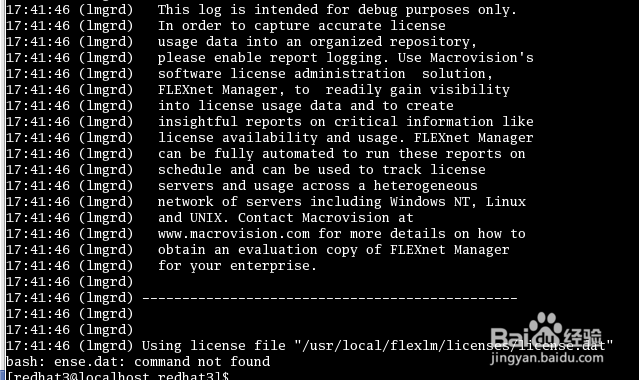
3、此时知道bash: ense.dat: command not found,又开始仔细检查licesne

4、从上图可以看到,license问题出现在这里
alias lmli='/home/eda/ic610/tools/bin/lmgrd -c /home/eda/ic610/share/license/lic
ense.dat'

5、为什么会出现这样的情况呢?主要是因为该软件在虚拟机中安装的,如果ternimal的界面窗口比较小的话,在设置环境变量时,就会出现一行未到头就开始新的一行。
6、重新修改后,其实也就是把原来的两行合并成一行,再重新启动,就可以了,如下图所示。
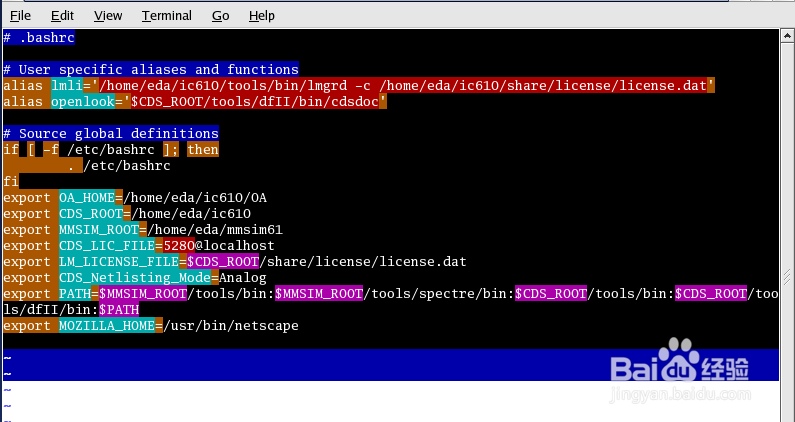
7、当建立一个新的cell时,错误的提示就没有了,就可以任意建立逻辑图了。
