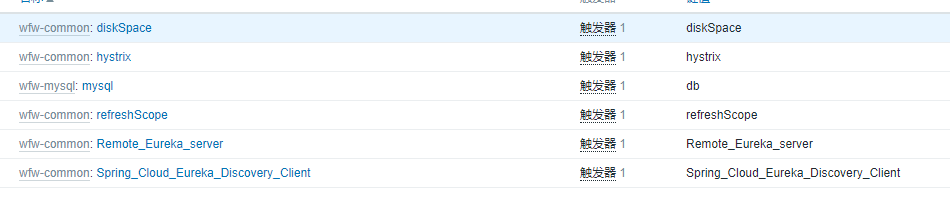
如何用zabbix监控微服务
1、通过微服务的health页面可以返回所包含的微服务的名称和状态值,如下图

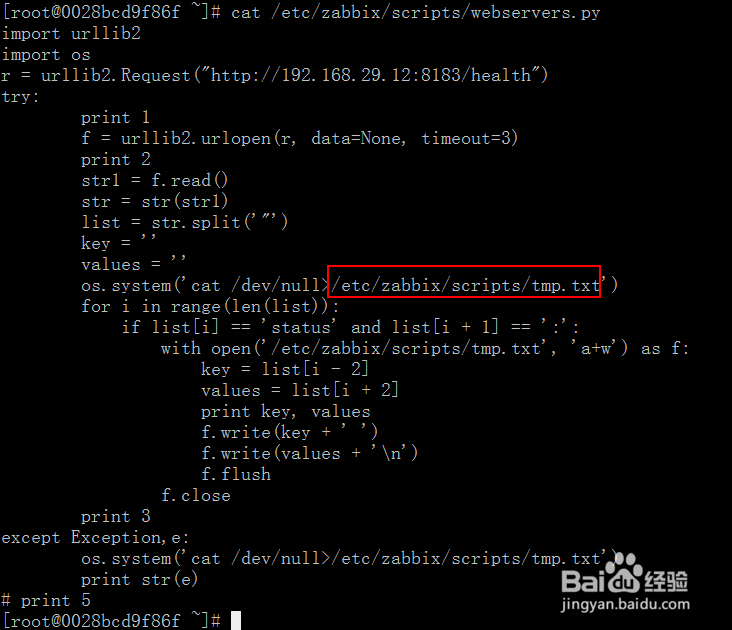
2、通过python脚本将上面“杂乱无章”的返回信息,通过python脚本进行切割然后返回到一个文本/etc/zabbix/scripts/tmp.txt中,python脚本内容如下
import urllib2
import os
r = urllib2.Request("http://192.168.29.12:8183/health")
try:
print 1
f = urllib2.urlopen(r, data=None, timeout=3)
print 2
str1 = f.read()
str = str(str1)
list = str.split('"')
key = ''
values = ''
os.system('cat /dev/null>/etc/zabbix/scripts/tmp.txt')
for i in range(len(list)):
if list[i] == 'status' and list[i + 1] == ':':
with open('/etc/zabbix/scripts/tmp.txt', 'a+w') as f:
key = list[i - 2]
values = list[i + 2]
print key, values
f.write(key + ' ')
f.write(values + '\n')
f.flush
f.close
print 3
except Exception,e:
os.system('cat /dev/null>/etc/zabbix/scripts/tmp.txt')
print str(e)
# print 5
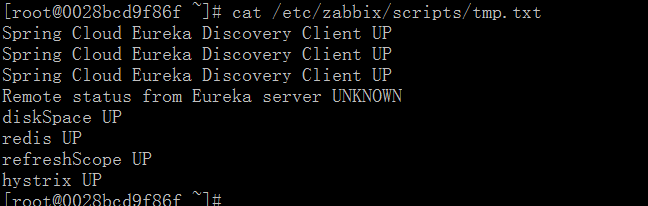
3、存放临时结果的文本内容如下,已经很清楚的反应微服务的名称和状态了
Spring Cloud Eureka Discovery Client UP
Spring Cloud Eureka Discovery Client UP
Spring Cloud Eureka Discovery Client UP
Remote status from Eureka server UNKNOWN
diskSpace UP
redis UP
refreshScope UP
hystrix UP
4、将该脚本加入到crontab中,新的结果覆盖旧的结果,这样就能实时的获取到微服务的状态值
[root@0028bcd9f86f ~]# crontab -l
#Ansible: None
*/1 * * * * /usr/bin/python /etc/zabbix/scripts/webservers.py >/dev/null 2>&1

5、配置zabbix_agent.conf,通过shell脚本weifuwu.sh读取/etc/zabbix/scripts/tmp.txt内容,作为自定义zabbix键值获取到的内容返回给zabbix server。weifuwu.sh脚本内容如下
#!/bin/bash
############################################################
# $Name: Disk_io_sdb.sh
# $Version: v1.0
# $Function: Disk IO
# $Description: Monitor Dist IO sdb Status
############################################################
DISKIO_COMMAND=$1
txt=tmp
Remote_Eureka_server(){
fanhui=`cat /etc/zabbix/scripts/$txt.txt |grep 'Remote status from Eureka server'|awk '{print $NF}'| sort | uniq`
result=$(echo "DOWN" | grep "$fanhui")
if [[ $result != "" ]];then
#echo $result
echo 0
else
#echo "UP"
echo 1
fi
}
Spring_Cloud_Eureka_Discovery_Client(){
fanhui=`cat /etc/zabbix/scripts/$txt.txt |grep 'Spring Cloud Eureka Discovery Client'|awk '{print $NF}'| sort | uniq`
result=$(echo "DOWN" | grep "$fanhui")
if [[ $result != "" ]];then
#echo $result
echo 0
else
#echo "UP"
echo 1
fi
}
diskSpace(){
fanhui=`cat /etc/zabbix/scripts/$txt.txt |grep 'diskSpace'|awk '{print $NF}'| sort | uniq`
result=$(echo "DOWN" | grep "$fanhui")
if [[ $result != "" ]];then
#echo $result
echo 0
else
#echo "UP"
echo 1
fi
}
mongo(){
fanhui=`cat /etc/zabbix/scripts/$txt.txt |grep 'mongo'|awk '{print $NF}'| sort | uniq`
result=$(echo "DOWN" | grep "$fanhui")
if [[ $result != "" ]];then
#echo $result
echo 0
else
#echo "UP"
echo 1
fi
}
refreshScope(){
fanhui=`cat /etc/zabbix/scripts/$txt.txt |grep 'refreshScope'|awk '{print $NF}'| sort | uniq`
result=$(echo "DOWN" | grep "$fanhui")
if [[ $result != "" ]];then
#echo $result
echo 0
else
#echo "UP"
echo 1
fi
}
hystrix(){
fanhui=`cat /etc/zabbix/scripts/$txt.txt |grep 'hystrix'|awk '{print $NF}'| sort | uniq`
result=$(echo "DOWN" | grep "$fanhui")
if [[ $result != "" ]];then
#echo $result
echo 0
else
#echo "UP"
echo 1
fi
}
db(){
fanhui=`cat /etc/zabbix/scripts/$txt.txt |grep 'db'|awk '{print $NF}'| sort | uniq`
result=$(echo "DOWN" | grep "$fanhui")
if [[ $result != "" ]];then
#echo $result
echo 0
else
#echo "UP"
echo 1
fi
}
case $DISKIO_COMMAND in
Remote_Eureka_server)
Remote_Eureka_server;
;;
Spring_Cloud_Eureka_Discovery_Client)
Spring_Cloud_Eureka_Discovery_Client;
;;
diskSpace)
diskSpace;
;;
mongo)
mongo;
;;
db)
db;
;;
refreshScope)
refreshScope;
;;
hystrix)
hystrix;
;;
*)
echo $"USAGE:$0 {Remote_Eureka_server|Spring_Cloud_Eureka_Discovery_Client|diskSpace|mongo|refreshScope|hystrix|db}"
esac
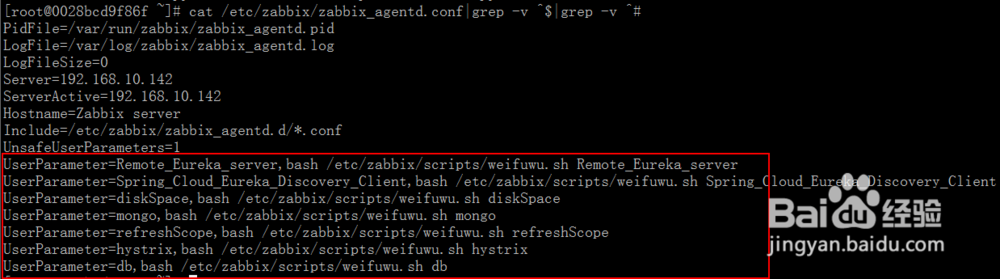
6、再配置监控项、触发器,通过键值就能获取到微服务最新状态,如果触发了触发器阀值,就能实现微服务的告警了